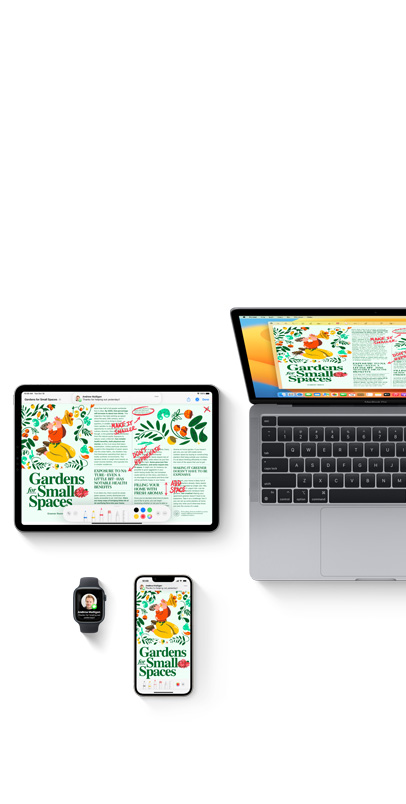
Apps by?Apple
Connect, create, and get things done with powerful and intuitive apps designed to be accessible, private, and?secure.
Connect, create, and get things done with powerful and intuitive apps designed to be accessible, private, and?secure.



For the creator who does it all, here’s a collection of apps that do too. Access powerful AI features for a faster workflow. Craft your stories with video in Final?Cut?Pro. Produce your best music in Logic?Pro. Reimagine images in Pixelmator?Pro. And supercharge productivity with premium content in Keynote, Pages, Numbers, and?Freeform.1


The Apple Games app puts all your games from the App Store and Apple Arcade in one place.
Get personalized recommendations based on what you and your friends are playing. Play head-to-head
or compete in solo challenges. Catch in-game events and see your friends’ latest achievements.
And you can even connect a controller to get the most out of each game.3


Subscribe to Apple?Creator?Studio and get premium content and powerful AI features in Keynote, Pages, Numbers, and Freeform to help?boost productivity.


Apple Invites is a new iCloud+ feature that helps you celebrate any
occasion. Personalize your invitation
with photos from your library, or
create something entirely unique with Image Playground.4 Add details
like
music, maps, and photos to bring your event to life. Then send to anyone
so they can RSVP.


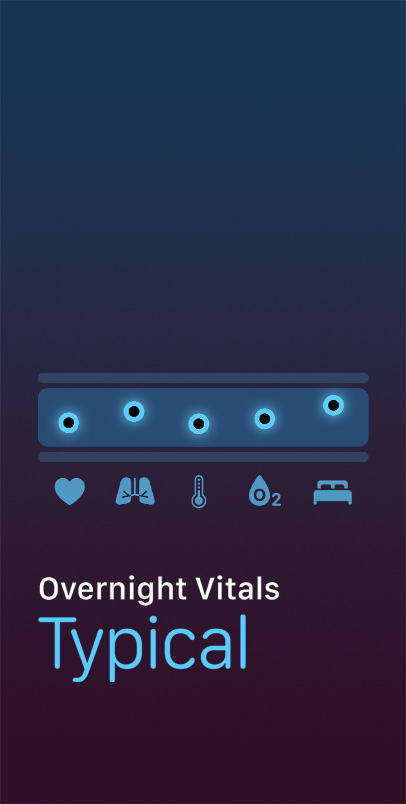
Understand your daily health status right from your wrist. Wear your Apple Watch
to sleep to track
overnight vitals such as average heart rate, respiratory rate, and wrist temperature.
And get notifications when any
of your metrics fall outside your typical range.


Create any image you can dream up. Use concepts, descriptions,
and your photo library to
create fun, playful images in multiple styles
within seconds. Image Playground is integrated
across apps, so
you can use it in places like Messages to express yourself.5


The Passwords app lets you access account passwords, passkeys,
Wi‑Fi passwords, and verification codes — all in one place.
It helps
manage credentials across devices with iCloud and alerts you to
insecure passwords. You can create, save, and customize strong
passwords, share?them with others, and more.
Connect with friends and family on video or audio calls. And share your screen or use SharePlay to listen to music together, watch TV, and?more.
Mac, iPad, iPhone, TV
Access email from iCloud, Gmail, Exchange, Yahoo, Outlook, and other providers in one place — and enjoy powerful productivity features.
Mac, iPad, iPhone, Watch
Manage contacts and keep their information up to date across your devices and accounts. And customize how you appear to others with Contact Posters.
Mac, iPad, iPhone, Watch
Get in touch with other Apple?Watch users in just a tap. You can control your availability and decide when you can be?contacted.
Watch
Use concepts, descriptions, and people from your photo library to create playful images with Apple Intelligence.5
Mac, iPad, iPhone
Transform your iPhone, iPad, or Apple Watch into a portable recorder. Layer recordings, add vocals to existing song ideas, and import directly to Logic Pro.
Mac, iPad, iPhone, Watch
Browse, edit, and share your amazing photos and videos. And use intelligent, personalized features that help you find, enjoy, and share your best shots.
Mac, iPad, iPhone, Watch, TV
View your favorite moments in the Library tab, enjoy your Memories in the For You tab, and use intelligent search to easily find specific people, places, events, objects, scenes, and?text.
Fine-tune your photos and videos with powerful, easy-to-use tools and fine-grained control. Choose new keyframes and fun effects for Live?Photos. And change the depth of field and add dramatic lighting effects to portrait images.
Use AirDrop with ease. Share directly to your favorite apps. View photos shared with you in Messages right in the Photos app. Or create a shared album for anyone. And with iCloud Shared Photo Library, you can seamlessly share photos with loved ones.
Take stunning photos and videos with true-to‑life color in any situation — from?everyday snapshots to studio-quality portraits.
iPad, iPhone
Make music with ease — using a fully equipped music creation studio, a complete Sound Library that includes instruments, and more.
Mac, iPad, iPhone
GarageBand turns your Mac, iPad, and iPhone into a full-featured recording studio — so you can make music anywhere you go. Use Multi‑Touch to play keyboards and guitars, create beats, and more. And with Live Loops, have fun creating music like a DJ.
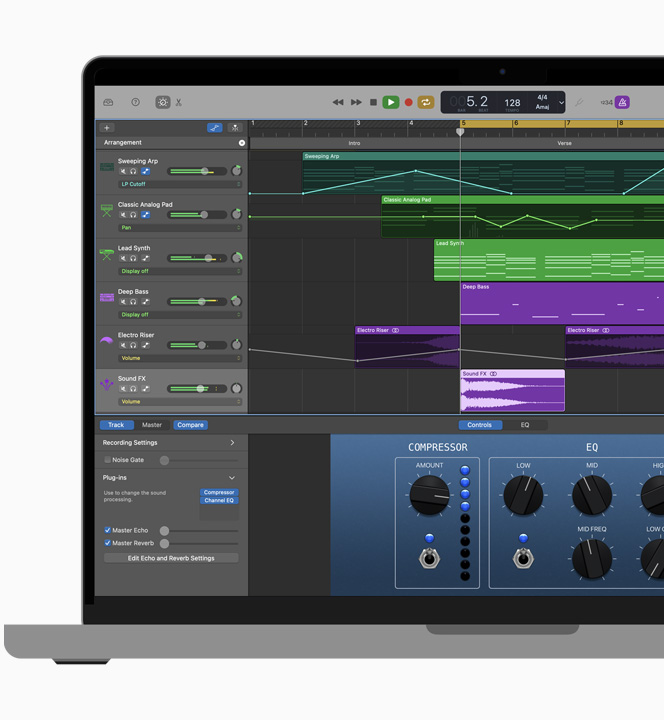
Lots of helpful recording and editing features make GarageBand for Mac as powerful as it is easy to use. Edit your performances right down to the note and decibel. Fix rhythm issues with a click. Finesse your sound with audio effect plug?ins. And finish your track like a pro, with effects such as compression and visual?EQ.
Wherever you are, iCloud makes it easy to work on a GarageBand song. You can add tracks to your GarageBand for Mac song using your iPhone or iPad when you’re on the road. Or when inspiration strikes, you can start sketching a new song idea on your iOS device, then import it to your Mac to take it even?further.
Create memorable cinema-quality videos with intuitive editing tools and storyboard options for Hollywood-style trailers and?movies.
Mac, iPad, iPhone
It’s easy to create videos with iMovie. Just choose your clips, then add titles, music, and effects. Or let Magic?Movie or Storyboards help craft your project. iMovie even supports 4K video for stunning cinema-quality films.
Add photos and videos to projects, trim clips, add seamless transitions, and fade audio. You can also import and edit ProRes video9 in your movies and trailers — and adjust Cinematic mode videos directly in the Storyboards feature to help shape your story.
Make action shots more exciting by slowing them down. Let viewers fly through scenes by speeding them up. Or add a broadcast feel to your work with picture?in?picture, split?screen, and green-screen effects.
Build memorable presentations and collaborate in real time with intuitive?tools and?effects. As an Apple?Creator?Studio subscriber, you get?premium content and powerful intelligence.
Mac, iPad, iPhone, Watch
Enjoy a simple, intuitive interface filled with powerful tools and dazzling effects. Choose from over 40 themes or create your own slide designs, then add charts and photos and incorporate cinematic?effects.
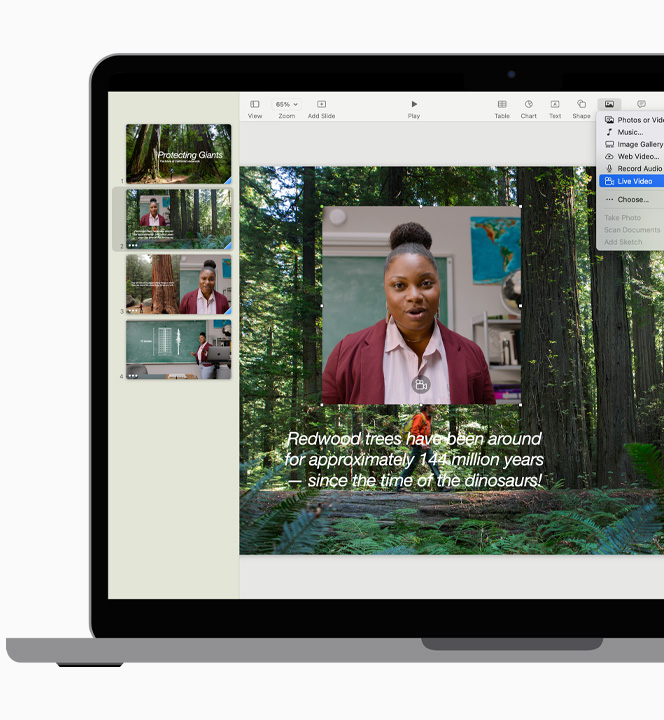
Share your slides remotely or in person, with each team member taking control of their section of the deck. Add a live video feed of your camera to make content more engaging. And use iPhone, iPad, or Apple?Watch as a remote.
Move seamlessly across all your Apple devices. And work together in the same deck with your teammates. You can see edits as they’re made, and your team can watch as you make yours. You can even get notifications when people join, edit, or?comment.
A suite deal for any?creator.
As a subscriber to Apple?Creator?Studio, you get all-new exclusive content and powerful AI features. So you can turn text into slides, generate presenter notes, clean up a slide’s layout, and create pro-quality images.
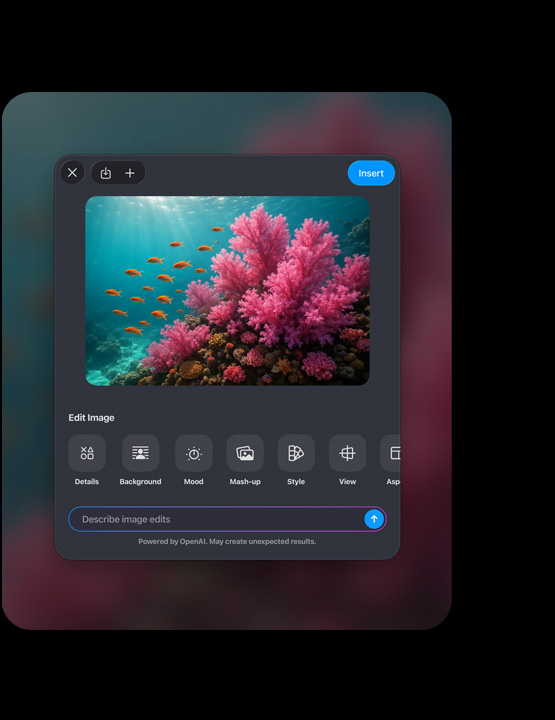
Design stunning documents, collaborate in real time, customize fonts and text styles, and?add graphics. As an Apple?Creator?Studio subscriber, you get?premium content and powerful intelligence.
Mac, iPad, iPhone
Design documents from scratch or choose from over 90 beautiful templates. Customize fonts, personalize text styles, and add gorgeous graphics to take the entire page to the next level.
Track changes, add highlights, and easily navigate your document with the table of contents view. Create and publish interactive books. And use Screen View for an optimized experience on?iPhone and iPad.
Work together in the same document and have threaded conversations with your teammates — whether they’re on a Mac, iPad, iPhone, or PC. And you and your team can view live?edits.
A suite deal for any?creator.
As a subscriber to Apple?Creator?Studio, you get the all-new Content?Hub with high-quality assets, exclusive customizable templates, and the ability to create and edit pro-quality images with powerful intelligence.

Create beautiful spreadsheets, visualize your data, and collaborate in real time. As an Apple?Creator?Studio subscriber, you get premium content and powerful intelligence.
Mac, iPad, iPhone
Start with gorgeous, ready-to-use templates, then customize them any way you like. Add, resize, and stylize tables. Enter data on the go with forms. And use Apple?Pencil with your iPad to create diagrams and illustrations.
Choose from hundreds of functions to process your data. Intuitive tools make it simple to perform complex calculations with great precision, apply formulas, filter data, and sum up what it all?means.
Numbers works seamlessly across all your Apple devices, so you don’t have to stay in one place or on one device. And real-time collaboration lets your team work together — whether they’re on a Mac, iPad, iPhone, or?PC.
A suite deal for any?creator.
As a subscriber to Apple Creator Studio, you can take Numbers to new levels with all-new exclusive content and new AI features like Magic Fill, which generates content or formulas for your spreadsheet based on recognizing patterns in your data. And you can create and remix pro-quality images with powerful intelligence.

Brainstorm a project, design a mood board, and collaborate in real time. As an Apple?Creator?Studio subscriber, you get premium content and powerful intelligence.
Mac, iPad, iPhone
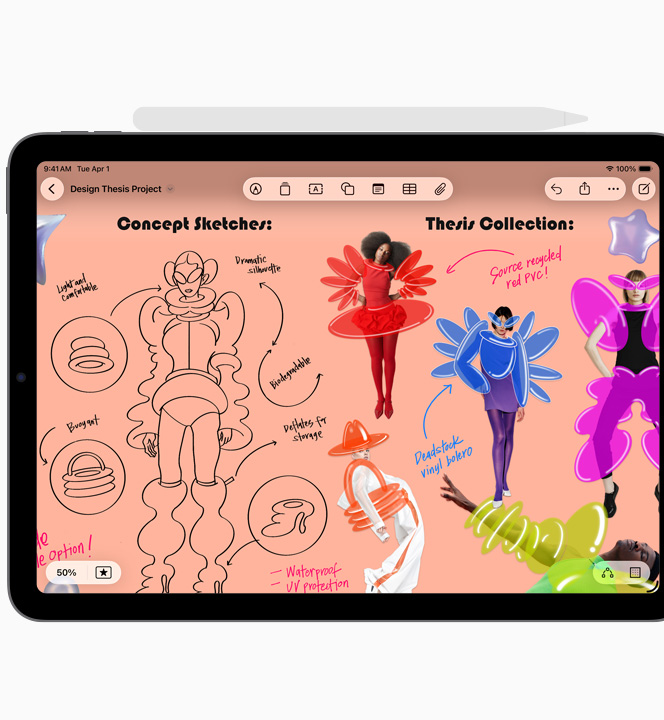
Create a board for any project. Brainstorm and collaborate easily with sticky notes, write or draw ideas fluidly, or add stickers to polish a mood board. Add any type of file, from photos and documents to voice?memos.
Draw anywhere on the canvas with iPhone and iPad. Use your finger or Apple Pencil, and choose from a variety of brush styles, weights, colors, and more. And with scenes, you can organize your boards and move through them quickly when you’re presenting.
Work on boards together and view updates in real time. Freeform works seamlessly across your Apple devices, whether you’re on iPhone, iPad, or Mac.
A suite deal for any?creator.
As an Apple Creator Studio subscriber, you get powerful features right inside Freeform. The new Content?Hub gives you a broad range of stunning assets to drop into your boards. And advanced image creation makes it supereasy to visualize your ideas in the?app.

Jot down short or long notes — anytime, anywhere. You can add checklists, images, drawings, audio recordings, and even scanned documents.
Mac, iPad, iPhone
Remember everything from to-do lists
to project tasks. Quickly create reminders on the go and customize your lists and alerts with powerful tools.
Mac, iPad, iPhone, Watch
Plan your time effectively with
all your calendars in one place —
and coordinate with others using invitations and shared calendars.
Mac, iPad, iPhone, Watch
Search, browse, and organize files stored on your Mac, iCloud Drive, external drives, and other cloud providers. Save favorites, batch rename files, collaborate, and more.
Mac
Browse, locate, and organize files stored on?your device, iCloud Drive, external drives, and?other cloud providers. Use tags and recents to keep items at your fingertips.
iPad, iPhone
Create custom automations or
choose from
hundreds of built-in actions in your favorite apps to help you accomplish everyday tasks with a simple?tap.
Mac, iPad, iPhone, Watch
Follow stocks on major global exchanges, view quotes and track performance, and get news about individual stocks and the business?world.
Mac, iPad, iPhone, Watch
Easily access your passwords, passkeys, and other credentials in one place. Quickly sign in with AutoFill, get alerts for compromised accounts, and sync on the go.
Mac, iPad, iPhone
Enjoy the internet with blazing‑fast speed, optimized battery life, and powerful privacy protections built right in.
Mac, iPad, iPhone
Discover great places and get around with natural language guidance, offline maps, and more — all with
your privacy protected.
Mac, iPad, iPhone, Watch
Check current and forecasted weather
at
a?glance. And view precipitation and wind conditions.
Mac, iPad, iPhone, Watch
Track items with AirTag, share your location with friends and family, and find your devices — even if they’re offline.
Mac, iPad, iPhone, Watch
Securely store boarding passes, tickets, car keys, and?more — all in one place.11
iPhone, Watch
Translate voice and text, have a conversation between languages, or translate text in?photos.
iPad, iPhone
Launch all your games in one personalized app. Access any game you’ve downloaded from the App Store in?your library, explore curated recommendations, and play with friends?across your Apple devices.3
Mac, iPad, iPhone
Enjoy unlimited access to 200+ games with no?ads or in-app purchases across all your Apple devices. Subscribe and enjoy with your entire family.
Mac, iPad, iPhone, TV
Subscribe to and watch streaming services, Apple?TV, and?more.
Mac, iPad, iPhone, TV
Play over 100 million songs and
30,000 playlists ad-free across your devices, get personalized recommendations, and immerse yourself in lossless and Spatial Audio.12
Mac, iPad, iPhone, Watch, TV
Listen to millions of shows, from big names to independent publishers,
and?get access to premium content with?subscriptions.
Mac, iPad, iPhone, Watch
Discover books online or offline — including classics and?more.
Mac, iPad, iPhone, Watch
Organize and access your health
and
fitness data in one secure,
central place — and share your information with those you trust.
iPad, iPhone
View and share your fitness and
activity details?— and subscribe to Apple?Fitness+ for thousands of trainer‑guided video and?audio
workouts and?meditations.
iPad, iPhone, Watch, TV
Track your workout sessions, set
specific goals, view advanced metrics, and receive updates like pace alerts and goal progress along the way.
Watch
Meet your sleep goals — including getting enough sleep, getting to
bed on time,
and even creating a bedtime routine.
iPhone, Watch
View your resting, walking average,
workout, and postworkout heart rate
each day. And receive notifications for unusually high or low heart rates.
Watch
Improve your wellbeing by logging your state of mind, practicing deep breathing during guided sessions, or meditating with Apple?Fitness+.
Watch
Reflect on everyday moments and life’s
special events using inspiration from
private, personalized suggestions — and include your photos, videos, and more.
iPhone
Keep your photos, files, notes,
and more safely backed up
and available wherever you are.
Upgrade to iCloud+
for premium
features and more storage.
Mac, iPad, iPhone, Watch, TV
Work seamlessly across Apple devices.
Start a task on one device and?finish on another. And even use them together with Continuity Camera, Universal Control, and more.
Mac, iPad, iPhone, Watch, TV
Share subscriptions like Apple TV, Apple Music, iCloud+, and more with up to five other people. And manage online activity for kids with parental controls.
Mac, iPad, iPhone, Watch, TV
Share videos, photos, music, and?more from Apple devices to Apple?TV?4K, Mac, your favorite speakers, and popular smart TVs.
Mac, iPad, iPhone, Watch, TV
Experience the world’s largest
augmented reality platform, with millions of AR?enabled devices and thousands of?AR apps.
iPad, iPhone
Activity Monitor
Alarms
Apple Business Essentials
Apple Configurator
Apple Developer
Apple?Remote Desktop
Apple Store
Apple Support
Audio MIDI Setup
Automator
Blood Oxygen
Bluetooth File Exchange
Calculator
Camera Remote
Chess
Classroom
Clock
ColorSync Utility
Compass
Console
Create ML
Depth
Dictionary
Digital Color Meter
Disk Utility
DVD Player
ECG
Find Devices
Find Items
Find People
Font Book
Grapher
Image Capture
iTunes Remote
iTunes?Store
Keychain Access
Logic Remote
Magnifier
Measure
Medications
Memoji
Migration Assistant
Mission Control
Move to iOS
Noise
Now Playing
Photo?Booth
Preview
QuickTime Player
Reality Composer
Remote
Schoolwork
Screenshot
Script Editor
Settings
Shazam: Music Discovery
Siren
Stickies
Stopwatch
Swift Playgrounds
System Information
System Settings
Terminal
TestFlight
Texas Hold’em
TextEdit
Tides
Time Machine
Timers
Tips
VoiceOver Utility
Windows Migration Assistant
World Clock
Xcode
Every app by Apple comes with powerful
privacy features to help protect your data and
give you control over your information.
Accessibility features are built into every
Apple product and app — to
help all people
learn, create, and do what they love.
The App Store has millions of apps that bring you amazing experiences. And every
one of them meets Apple’s standards for privacy, security, and content.